









Autonomous agents are progressing slowly in French companies. Five simple projects, such as onboarding or support, allow them to be installed without difficulty.
Currently, the deployment of AI agents is progressing cautiously within French companies. Production is established in the areas of “supply chain”, “demand forecasting” and logistics. But operational complexity, in particular, still slows down massive expansion. According to Anthony Cirot (VP EMEA South at Google Cloud), organizations are currently only deploying 2 to 5 use cases, while the identified potential amounts to nearly 200.
We have selected five areas that are possibly simpler to implement: onboarding, internal FAQs, repetitive requests, document preparation and team support. For each, we will see why they work well and how to go about setting them up.
Onboarding: HR auditor and secretary to optimize the arrival of a newcomer
Unlike other complex AI projects, onboarding is based on clear rules and existing documents. An agent error does not directly impact the end customer or production. Installing AI agents in this industry also frees HR from administrative tasks and can provide a seamless experience for newcomers.
The design of these AI agents first requires asking the questions that could be those of an HR: “How many agents do we need for specific tasks? What will be their titles, their roles, their objectives, their characters? Or even: what files will the agent have access to?”
In the case of onboarding, we define two agents. The inspector must check the presence of administrative files in a folder. The “HR Secretary” takes the inspector’s raw report and turns it into a welcoming message. To implement this, we then take care of the technical architecture. Note that the following procedure can be repeated, by adapting it, for other use cases.
We first open the terminal, “PowerShell” on Windows or “Terminal” on Mac, and type this line: pip install crewai langchain-openai. This command allows you to download and install two essential engines for the project: “crewai”, the software which allows you to create agents and make them work in teams, and “langchain-openai”, which allows “CrewAI” to communicate with OpenAI’s AI.
We then create a folder named “MyHRProject” on your desktop, with this structure inside:
- MyHRProject/
- onboarding_jean/ (We deliberately create two empty files: “RIB.txt” and “contrat_signe.txt”.)
- verif_onboarding.py (This is where we will write the code.)
- .env (For our API key.)
To quickly create this file, we go to “PowerShell”: cd C:UsersadminMonProjetRH
And: New-Item .env
We are looking for the API key on “https://platform.openai.com/” > “API keys” > “Create new secret key”. We put it in the “.env” file: OPENAI_API_KEY=NOTRE_API_KEY
We then write this code in verif_onboarding.py with notepad or in VS Code:
import os
from crewai import Agent, Task, Crew
from crewai_tools import DirectoryReadTool
from dotenv import load_dotenv
load_dotenv()
# 1. L'outil pour regarder dans le dossier
outil_dossier = DirectoryReadTool(directory='./onboarding_jean')
# 2. PREMIER AGENT : L'Inspecteur (le "cerveau" technique)
inspecteur = Agent(
 role="Vérificateur RH",
 goal="Vérifier si RIB.txt, contrat_signe.txt et mutuelle.txt sont présents.",
 backstory="Tu es un assistant administratif précis et rigoureux.",
 tools=[outil_dossier],
 verbose=True
)
# 3. DEUXIÈME AGENT : Le Secrétaire (le "cœur" de la communication)
secretaire = Agent(
 role="Secrétaire RH",
 goal="Transformer le rapport technique en un message poli pour l'employé.",
 backstory="Tu es accueillant et tu aimes aider les nouveaux arrivants.",
 verbose=True
)
# 4. PREMIÈRE MISSION : Vérification (brute)
mission_verif = Task(
 description="Regarde dans le dossier et liste les documents manquants.",
 expected_output="Une liste brute des documents absents.",
 agent=inspecteur
)
# 5. DEUXIÈME MISSION : Mise en forme (polie)
mission_polie = Task(
 description="Prend la liste des manquants et rédige un message très poli pour demander au nouvel employé de les envoyer.",
 expected_output="Un message de bienvenue chaleureux incluant la liste des documents à fournir.",
 agent=secretaire,
 context=[mission_verif] # <--- C'est ici que le Secrétaire "lit" le travail de l'Inspecteur
)
# 6. LANCEMENT DE L'ÉQUIPE (On met les 2 agents et les 2 missions)
equipe = Crew(
 agents=[inspecteur, secretaire],
 tasks=[mission_verif, mission_polie]
)
resultat = equipe.kickoff()
print("n--- MESSAGE FINAL DE VOTRE ÉQUIPE D'AGENTS ---")
print(resultat)
Here, the inspecting officer takes inventory and writes a raw report. CrewAI collects it and passes it to the secretary agent who writes a polite message.
We run this in Powershell by going into our folders and typing:
python verif_onboarding.py
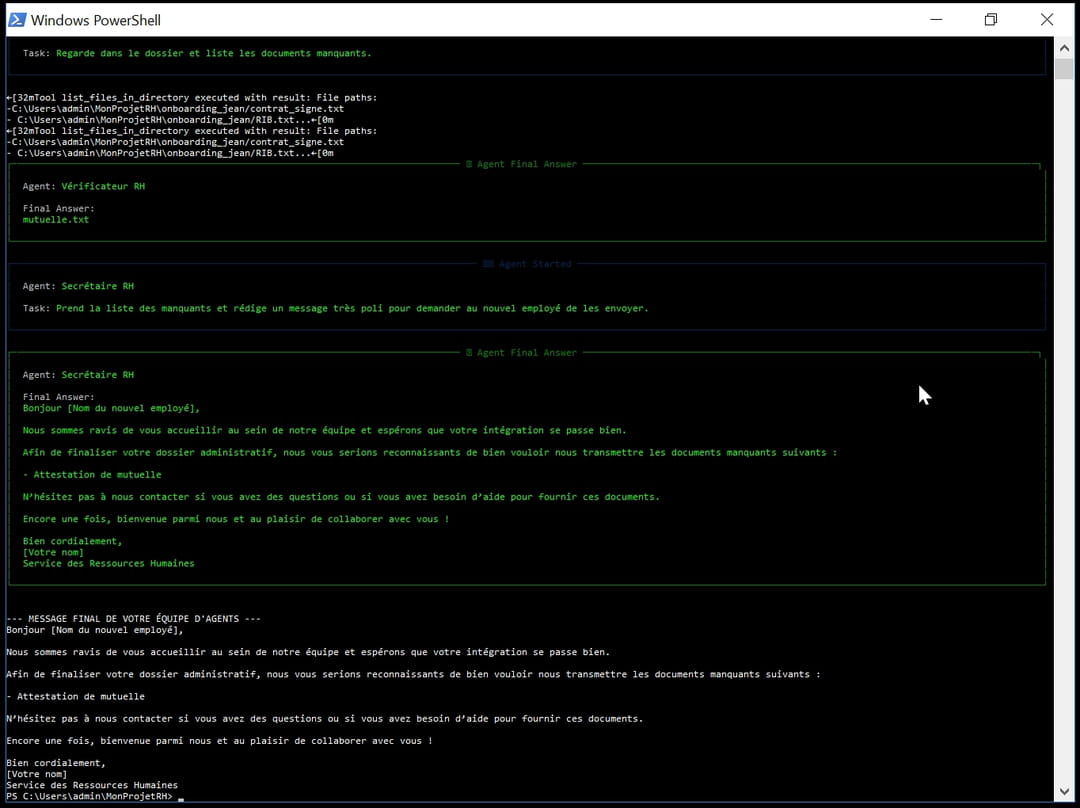
We see that the tasks have been well implemented. The “HR checker” agent uses the list_files_in_directory tool to look in the employee’s computer file. He sees that the mutual insurance document is missing. Following this, the “HR Secretary” agent writes a structured and professional email, ready to be sent. He asks the employee for the mutual insurance certificate while welcoming him.
Internal FAQ: an inspector and a secretary available
The AI agents in the FAQ use RAG (“Retrieval Augmented Generation”). This almost completely eliminates the risk of “hallucinations”. Simply edit the FAQ documents and the agents will update automatically. This system can notably free experts (HR, IT, General Services) from repetitive questions, such as: “What is the wifi code?”, “How do I report a claim?”.
To install this, we first create a “FAQ Inspector” agent. Its only role is to “read” the documents. These can, for example, be located in the “onboarding_jean” folder, created in the previous example. After that, the “FAQ Secretary” agent takes the raw information and provides a tailored response to the employee.
The technical implementation is “stripped”. A single line in the terminal (pip install crewai langchain-openai) is used to install the AI engines. A single folder on the desktop (“MyHRProject”) is enough to store documents and code. The FAQ documents are the only “keys to the office” to give to the agent. It does not have access to anything else, which guarantees better security. As we saw in the “verif_onboarding.py” code, CrewAI links these agents. It takes the answer found in your documents and passes it to the communications officer.
Concretely, to get started, identify the frequently asked questions. Then put the answers in a folder. And launch your agent with the command: python verif_onboarding.pyYou can use a simple “Slack”, “Teams” channel or a small internal chat window as an interface for the employee to ask a question.
Repetitive requests: logistics and IT support to save time
Requests for computer equipment (computers, screens, mice) can be frequent. The deployment of AI agents can be interesting to overcome this without too much risk. IT inventory does not normally rely on sensitive data. Inventory management is binary: either the object is there (1), or it is not there (0). An error is usually minimal.
You can first create a logistics agent to check if the material is in stock. Then, the “IT Support” agent confirms the order or offers an alternative. Installation is still simple, via the terminal: pip install crewai langchain-openai.
Installation is still simple, via the pip install crewai langchain-openai terminal. We create a folder on the desktop with this organization:
- MyITProject/
- inventory/ (we place a file there stock.txt listing for example: “2 Laptops, 5 Mice, 0 Screens”. We can use a Python function (update_stock) to physically subtract the material from stock as soon as an order is validated.)
- hardware_management.py (The code of your agents)
- .env (the API key)
In the management_materiel.py file, the Logistics agent will scan the stock.txt file. If an employee requests a screen, the agent will see “0 Screens”. CrewAI will forward the information to the IT Support agent. This person will, for example, write: “Hello, I have received your request for a screen. Unfortunately, we are out of stock. I will let you know as soon as we receive new ones next week.”
Document preparation: analyzer and editor hand in hand
The preparation of documents (contracts, reports, standard letters) offers the possibility of giving the AI its own document models. Final control of the human also exists. As with onboarding, we define two complementary roles. The “Technical Writer” agent collects the raw information (name, date, subject) and fills out a document template. The “Proofreader” agent checks the tone, spelling and ensures that the message is ready to be sent.
To install this, we use the same procedure as for our HR project. Installation is done in the terminal via: pip install crewai langchain-openai. A MyProjetDocs folder with a subfolder models/ contains typical Word or text files. The “Inspector” agent checks the source data, and the “Secretary” agent writes the final document.
The prepa_docs.py file replaces the previous verif_onboarding.py. Here is the code :
import os
from crewai import Agent, Task, Crew
from dotenv import load_dotenv
load_dotenv()
# 1. PREMIER AGENT : L'Analyseur (il extrait les données)
analyseur = Agent(
 role="Analyseur de Données Client",
 goal="Extraire le nom du client et le montant de la prestation.",
 backstory="Tu es expert pour trouver des informations précises dans des notes brutes.",
 verbose=True
)
# 2. DEUXIÈME AGENT : Le Rédacteur (il remplit le document)
redacteur = Agent(
 role="Rédacteur de Documents",
 goal="Rédiger une facture professionnelle basée sur les infos de l'analyseur.",
 backstory="Tu connais parfaitement les codes de la facturation et de la politesse.",
 verbose=True
)
# 3. LES MISSIONS
tache_extraction = Task(
 description="Dans la note suivante : 'Le client Jean Dupont doit 500€ pour la formation IA', trouve le nom et le montant.",
 expected_output="Le nom du client et le montant exact.",
 agent=analyseur
)
tache_redaction = Task(
 description="Rédige un projet de facture poli pour ce client.",
 expected_output="Un texte de facture complet avec salutations.",
 agent=redacteur,
 context=[tache_extraction] # <--- Toujours le lien entre les deux !
)
# 4. LANCEMENT
equipe = Crew(agents=[analyseur, redacteur], tasks=[tache_extraction, tache_redaction])
resultat = equipe.kickoff()
print("n--- DOCUMENT PRÉPARÉ ---")
print(resultat)
In this script, to simplify, the Analyzer agent sees that the customer is Jean Dupont and that the amount is €500. The drafting agent takes this information and draws up invoice no. 123 using the company’s standard template, with a suitable courtesy formula.
Team support: the librarian and the assistant to support you
There are several advantages to implementing AI agents to support teams (guides, procedures, FAQs). The AI agent handles a lot of the simple and repetitive questions. Experts are only called upon for complex cases.
For support, we keep the same technical architecture. The “Librarian” agent searches through PDF guides or text files. The “Support Assistant” agent makes the response clear and actionable.
As with other AI agent use cases, we install via terminal: pip install crewai langchain-openai. We create a MySupportProject folder with a guides/ subfolder containing our procedures.
For the code, we use the logic from verif_onboarding.py. The librarian agent looks in the guides/ folder, and the support assistant agent writes the final response based on what the inspector found.