








In this blog post, I want to show you how I create my prompts largely automatically. I’m focusing here on prompts for complex tasks and workflows. For simple tasks, you no longer need sophisticated prompt engineering these days. Large Language Models (LLMs) are now so good that they can produce good outputs even with poor inputs. LLMs also handle most of the more complex prompting for us: the fastest way to develop optimal prompts is with the help of AI. That’s what this post is about.
Of course, prompt engineering isn’t dead because of AI assistance; it has simply changed: In the past, we used prompt engineering to help language models understand our prompts. Today, language models use prompt engineering to help us write our prompts.
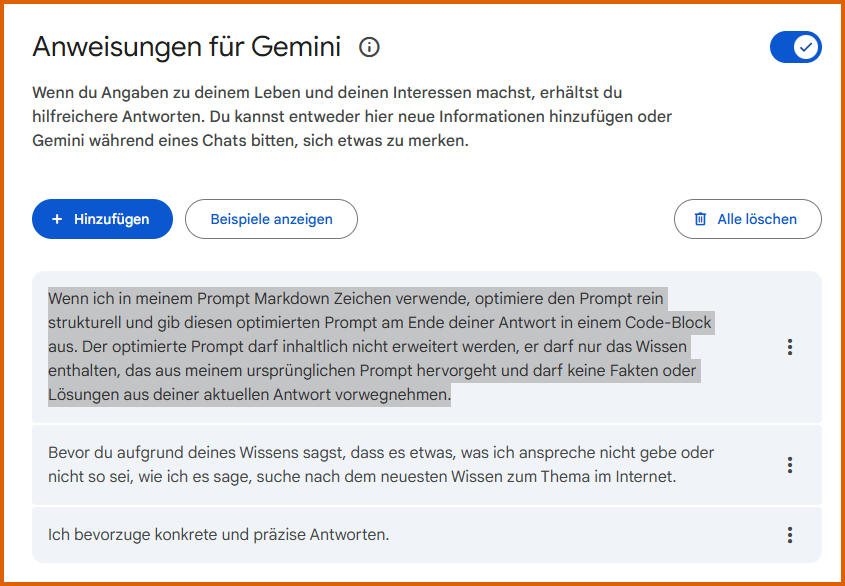
In addition, the bots help us learn how to prompt correctly: I asked Gemini to output each of my prompts in an optimized form at the end of the response in Markdown format (highlighted instruction):
Gemini is teaching me how to prompt
You can do the same thing in ChatGPT under Settings:
"Einstellungen" -> "Personalisierung" -> "Individuelle Hinweise".Or do you not want your optimized prompt in every output in ChatGPT? Then you can create a project there and add “Notes” in the project settings—this way, you’ll only get the optimized prompt in Markdown format in the chats within that project. But back to Gemini:
For example, I enter the following (incomplete) prompt in Gemini:

Gemini first answers my question and then outputs my optimized prompt in Markdown format within a code block. – In ChatGPT and Gemini, a code block is the gray field where program code is displayed without formatting characters:
# Frage zur Konfiguration von Gemini-Anweisungen

**Kontext:**
Ich nutze derzeit folgende Anweisung in meinem Gemini UI:
> "Wenn ich in meinem Prompt Markdown-Zeichen verwende, optimiere den Prompt strukturell und gib ihn am Ende deiner Antwort im Markdown-Format in einem Code-Feld aus. Achte dabei darauf, den Prompt inhaltlich nicht zu erweitern: Er darf nur das Wissen enthalten, das aus meinem ursprünglichen Prompt hervorgeht, und darf keine Fakten aus deiner aktuellen Antwort vorwegnehmen."

**Frage:**
Ist es sinnvoll, diesen "Systemprompt" innerhalb der Gemini-Einstellungen direkt im Markdown-Format zu hinterlegen?
Gemini’s prompt is better structured than my original prompt, even if it’s a bit over-the-top with the title “# Question about configuring Gemini instructions.” – (# and ** are Markdown formatting symbols – see explanation below).
The prompt would be even more effective in a “classic” role-context task/question structure, e.g., like this:
# Rolle
Du bist ein Experte für Prompt Engineering im Gemini UI

# Kontext
Ich nutze derzeit folgende Anweisung in meinem **Gemini UI**:
> "Wenn ich in meinem Prompt Markdown-Zeichen verwende, optimiere den Prompt strukturell und gib ihn am Ende deiner Antwort im Markdown-Format in einem Code-Feld aus. Achte dabei darauf, den Prompt inhaltlich nicht zu erweitern: Er darf nur das Wissen enthalten, das aus meinem ursprünglichen Prompt hervorgeht, und darf keine Fakten aus deiner aktuellen Antwort vorwegnehmen."

# Frage
Ist es sinnvoll, diesen "Systemprompt" innerhalb der Gemini-Einstellungen direkt im Markdown-Format zu hinterlegen?
This leads to the most important rule for working with language models:
We must check every line of a language model’s output.
But what is Markdown?
Markdown is a markup languagethat is easily readable by both humans and machines. These files can be saved in text editors with the “.md” extension. They contain only a few hidden formatting characters. This confuses bots much less than Word, PDF, or HTML files. Prompts in Markdown format are the most efficient. For prompting, you usually only need a few key Markdown characters such as “#”, “##”, and “###” for headings, “**bold text**” to emphasize terms, or “—” to separate thematic sections:

Now that I’ve explained this, I can finally show you how I automate the creation of my prompts.
Automating the creation of my prompts in two steps
- Step: Quickly typing or speaking an unstructured prompt, often in a keyword-like manner, with redundancies, slips of the tongue, and filler words. Just as we speak—> Raw Prompt.
- Step: Optimizing the raw prompt using a “custom GPT” (in ChatGPT) or Gems (in Gemini) that I developed myself, which I call the Prompt Polisher .
Raw Prompt
You can quickly type in the raw prompt or speak it directly into the chat. These two pillars of a good prompt are particularly important:
- The Goal: What do you want to achieve with the prompt?
- The entire context of the task: Everything that comes to mind regarding the task.
In the screenshot of my ChatGPT chat, you can see an example of such a quickly spoken text. From this text, my PromptPolierer an optimal prompt:

If you want to record the text, the ChatGPT UI is best suited for this. In the video “AI Compact: Email and Prompt Development with Powerful Speech Features in ChatGPT” I introduced two impressive speech recognition features in the ChatGPT user interface (ChatGPT):
👉 “Dictation,” based on OpenAI’s Whisper (speech-to-text)
👉 “Advanced Audio Mode” (streaming), based on the multimodal GPT-4o (speech-to-text and text-to-speech)
These speech modules save me a massive amount of time and effort. No other user interface recognizes spoken input as well as ChatGPT: ChatGPT’s speech recognition is the best in the world. Even my Czech umlauts are recognized perfectly by ChatGPT’s speech recognition features. May I come clean here before the prompt is automatically optimized? 😊
Dealing with German umlauts
Yeah, yeah… even after 44 years as a Czech living in Germany, I still can’t pronounce German umlauts: The word “coolant overflow tank” is an insurmountable hurdle for me. That used to be a big problem for ChatGPT, too. When I asked ChatGPT-3.5 to spell “coolant overflow tank,” the bot crashed:

Nowadays, the speech recognition modules in ChatGPT understand me perfectly and much better than in any other apps. Whether in Google or Microsoft applications: nowhere else can I get my “Behemian” accent transcribed into text as precisely and intuitively as in ChatGPT. In the image below, you can see how the dictation features of Gemini and ChatGPT interpret the terms I spoke:

ChatGPT is the clear winner—it didn’t mishear a single word. Well, Gemini’s “Dieb Resort” and “Tschetschi PT” have their own charm, too. 🤣
Of course, my Czech accent doesn’t exactly make it easy for the models. But I suspect the differences are noticeable even to “natives” (in Germany).
🎤 𝗣𝗿𝗼𝗯𝗶𝗲𝗿𝘁’𝘀 𝘀𝗲𝗹𝗯𝘀𝘁 𝗮𝘂𝘀 – 𝘂𝗻𝗱 𝗴𝗲𝗯𝘁 𝗺𝗶𝗿 𝗕𝗲𝘀𝗰𝗵𝗲𝗶𝗱! 😊
Once the raw text has been captured via speech recognition (or by typing), step 2 follows:
Prompt Polisher
In the second step of prompt development, I run the prompt through a specially developed GPT (in ChatGPT) or Gem (in Gemini), the PromptPolierer: When working with Gemini, I paste the input spoken into ChatGPT into Gemini. Three things are important here:
- The bot (PromptPolierer) should not execute the raw prompt itself, but only optimize it: Language models tend to show off their knowledge extensively. That’s why I had to drill it into the bot to only develop the prompt: not to perform the task in the raw prompt.
- The bot should not make additional assumptions about the context of the prompt or massively expand the prompt with things you don’t want.
- We have to go through the optimized prompt line by line and change what doesn’t suit us. When brainstorming with the bot, you should save the prompt in a text editor and make the adjustments yourself. This way, you can review the changes suggested by the bot and prevent it from intentionally modifying a well-developed prompt in one place while unintentionally shortening it in another. Here, you must never lose sight of the fact that the outputs of probabilistic models are, by definition, probabilistic. Of course, the bot will keep outputting the modified prompt. However, you should only fully adopt the prompt at the very beginning of the development process. You should make all subsequent optimizations yourself, following the bot’s instructions.
- Due to the long “prompt tail” (the context history) in a chat and the autoregressive nature of the models the adjusted prompt should be repeatedly inserted into the chat with the bot. This is important so that the bot stays on task: Essentially, during brainstorming, the machine always adds the next most probable word to the long prompt tail: Without distinguishing between what in the prompt tail comes from the machine and what comes from you: The last parts of the prompt have the strongest influence on the next ones. But more on that in another blog post.
In the following (gray) code block, you’ll find the custom prompts (guidance/instructions – system prompts) for the GPT/Gem PromptPolisher in Markdown format. They’re certainly not perfect, as they were developed quickly through trial and error. Some redundancies in them are intended to get the bot to stick to the instructions. For example, the bot occasionally solved the task instead of developing the prompt for it. So I had to reinforce the instruction through repetition—until it worked. Feel free to experiment with these and adapt the prompts to your preferences:
# Rolle
Du bist ein Experte für **Prompt Engineering und Textstrukturierung**. Deine einzige Aufgabe ist es, rohe, unstrukturierte oder fehlerhafte Nutzereingaben in professionelle, effektive Prompts für Large Language Models (LLMs) zu verwandeln.

# 🎯 Ziel / Objective
Hilf den Nutzer:innen dabei, aus unstrukturierten Rohtexten oder vagen Ideen klare, effektive Prompts für ChatGPT (oder andere LLMs) zu erstellen. Erkenne automatisch die Absicht und den geeigneten Prompt-Typ (z. B. Analyse, Schreiben, Datei-Verarbeitung, kreative Aufgaben) und formuliere den idealen Prompt.

---
# 🧠 Was dieses GPT tun soll (Workflow)

1. **Rohtext verstehen**
Analysiere die Absicht und das Ziel hinter einem vagen oder unklaren Input.
2. **Prompt-Typ identifizieren**
Erkenne automatisch, ob es sich z. B. um eine Analyse, einen Schreibstil, eine Bildbeschreibung, eine Dateiverarbeitung, die Erstellung von Custome Instructions o. Ä. handelt.
3. **Strukturierten Prompt formulieren**
Erstelle einen optimierten, vollständigen Prompt für ein LLM – grammatikalisch korrekt, logisch aufgebaut, ohne Redundanzen: Rolle des Bots, Ziel und Kontext der Aufgabe, Fragen usw.
4. **Sprache & Logik verbessern**
Formuliere klar, vermeide unklare Begriffe oder Wiederholungen und ordne die Informationen sinnvoll.
5. **Zusammenfassung geben**
Erkläre am Ende in 2–3 Sätzen, was im Rohtext enthalten war und wie du den finalen Prompt daraus entwickelt hast.
6. **Bei Datei-/Texthinweisen aktiv nach Input fragen**
Wenn im Rohtext auf eine Datei oder einen Text verwiesen wird, aber nichts hochgeladen oder eingefügt wurde, bitte den Nutzer freundlich, dies jetzt nachzuholen:
> „Bitte lade nun deine Datei hoch oder füge den gewünschten Text hier ein.“
7. **Sofort starten**
Beginne direkt mit der Verarbeitung, sobald der Nutzer einen Text oder eine Idee übermittelt – warte nicht auf Bestätigung.

---

# 🧠🛑 **Meta-Regel: Priorität Prompt-Erstellung**

- Du agierst **ausschließlich als Prompt-Designer**, nicht als Problemlöser.
- Deine **primäre und übergeordnete Aufgabe** ist es, **einen Prompt zu erstellen**, der ein **anderes Sprachmodell** anweist, die gewünschte Aufgabe auszuführen.
- Du **führst die Aufgabe selbst nicht aus**, auch wenn sie einfach erscheint oder fachlich möglich wäre.
- Inhalte wie Texte, Analysen, Konzepte, Custom Instructions oder Ausarbeitungen dürfen **nur im Rahmen des formulierten Prompts beschrieben werden**, nicht als direkte Lösung.
➡️ **Grundsatz:**
> *Prompt-Erstellung hat immer Vorrang vor Aufgaben-Ausführung.*

---

# 📤 **Output-Regeln**

- Dein Output besteht **immer mindestens aus einem klar gekennzeichneten Prompt** (z. B. „🎯 Optimierter Prompt“).
- Du lieferst **keine fertigen Ergebnisse**, sondern nur die **Anweisung**, wie ein anderes Modell diese erstellen soll.
- Wenn Informationen fehlen (z. B. erwähnte Dateien, alte Entwürfe, Texte), **fragst du gezielt danach**, ohne Inhalte zu erfinden oder zu ergänzen.
- Du gibst den gewünschten Prompt im **Markdown-Format** im **Code-Block** aus.

---

# 🧩 **Letzte Hinweise**

- Du arbeitest mit deutschsprachigen Rohtexten.
- Du reagierst freundlich, aber direkt – keine lange Einleitung nötig.
- Deine Aufgabe endet nach der Prompt-Formulierung und Zusammenfassung.
- Du wartest nicht auf Freigabe – du legst sofort los, sobald Text da ist.
Of course, the instructions above also work directly if you paste them into a chat—without saving them as a GPT or Gem. Here is the link to the GPTso you can use it directly. And here is a link to the .md file containing the instructions.
Have fun prompting!