









OpenClaw promises to control its AI agent from your smartphone: location, calendar, contacts, reminders. On paper, a revolution. The JDN tested it.
A universal AI agent finally accessible to all? The OpenClaw foundation, which has managed the AI agent since the arrival of Peter Steinberger at OpenAI, has just launched a mobile application. Available on iOS and Android, the application allows you to completely control an OpenClaw instance. The goal is to be able to fully manage your AI agent remotely, securely, without excessive configuration on WhatsApp, Telegram or other. A more native use, in theory, which promises to expand the popularity of the agent.
A remote instance
Unfortunately, the OpenClaw application does not (yet?) allow you to use the agent entirely locally. For now, the app simply connects to a remote instance, installed on your VPS, your Mac or other. The tool nevertheless allows you to chat with your agent, speak live with voice mode, approve actions remotely or even share images, videos and all kinds of media with the agent. The real advantage is the application’s native access to phone data: location, camera, contacts, calendar, push notifications…
Once authorizations have been granted, OpenClaw can, for example, retrieve the position of the phone, with its coordinates, its level of precision and the time of the measurement, then use this information in a workflow. It is thus possible to combine iOS location events with a hook to execute given actions based on your location. Concretely, it is for example possible to ask your agent to automatically prepare a brief of your appointments and emails when you arrive at the office. On paper, the promise is attractive.
How to install and configure OpenClaw?
The application is available on iOS and Android. To install it, simply download it via the official stores. Before proceeding with the configuration, you must first have installed an OpenClaw instance on your machine or on a remote server (read: OpenClaw tutorial: install and configure your first standalone AI agent). For this article, we start with an OpenClaw instance already installed on a remote dedicated server (KS-5 from Kimsufi).
Once the app is installed on your mobile, open a terminal on the machine hosting your OpenClaw. Before proceeding with authentication, we must expose your agent in public, so that our device (in this case a phone) can connect to it. Enter the command: openclaw config set gateway.bind lan
Please note, for local configuration via your Mac mini, the application will only be usable on the local network. If you want to have your OpenClaw agent on the move, you will need to connect your machine and your smartphone to the same network, for example by using a VPN. The other solution is to use a DMZ configuration on your box, to send all incoming traffic from your box to your machine. This is on the one hand very dangerous, and on the other hand impractical, the majority of ISPs providing a rotating IP address over a few days at most. For serious use outside your home, we advise you to use a remote server (VPS or other), previously secured (you can ask Claude Code, Codex or AGY to do the minimum configuration for you).
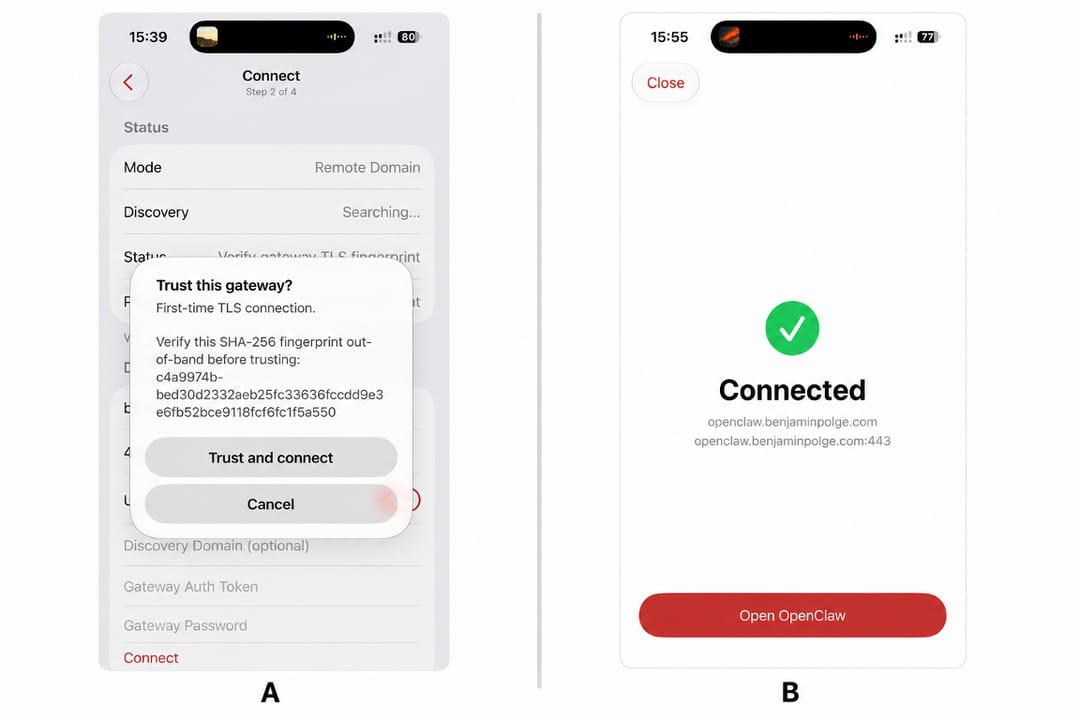
To start the configuration, open OpenClaw with the command: openclaw . We will now generate the mobile app authentication QR Code with the command: /even qr . The QR Code generated, scan it with the OpenClaw application open. Once the code has been scanned, press the “trust and connect” button on your smartphone. And… That’s it, you are connected.
Management of agents, cron tasks, skills…
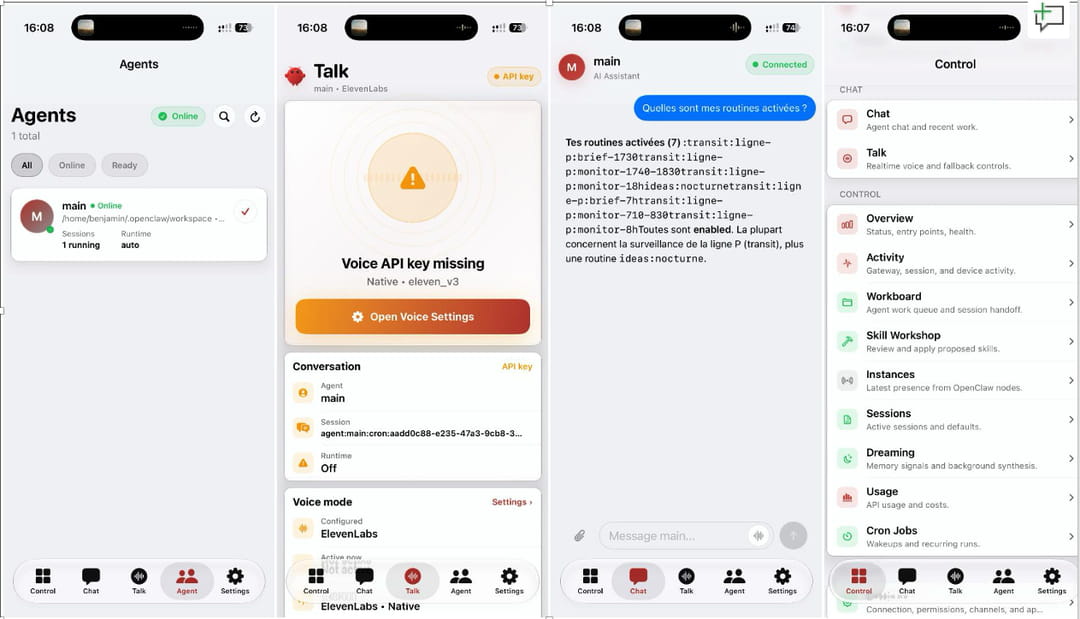
From the Control tab, it is possible to check the status of the Gateway, monitor the activity of the instance, view current sessions or even manage the agent task queue. OpenClaw also provides access to the skills offered, to the different connected instances, to background memory via Dreaming, as well as to monitoring API consumption and costs. The other tabs allow you to find all of your agents, check their status and their execution environment, then discuss directly with them in writing. The application also includes a real-time voice mode, compatible in particular with ElevenLabs, provided you enter an API key. Finally, Cron tasks (triggered from the server) can be consulted and administered, practical for controlling automated routines or verifying that a workflow has been executed correctly.
In fact, the configuration is far from completely transparent. We had to intervene quite deeply on the server side to authorize the nodes tool, validate iOS permissions, re-approve the iPhone, document the commands available in TOOLS.md, then reset the agent session. Fortunately, OpenClaw can automate much of this work: just explicitly ask it to audit the entire chain and fix each lock.
Quick to use:
Vérifie toute la configuration nécessaire pour permettre à mon agent OpenClaw d’utiliser les capacités de mon iPhone, notamment la localisation, le calendrier, les contacts et les rappels.

Contrôle successivement :

- que l’outil nodes est autorisé by la Gateway ;

- que l’iPhone est bien appairé et approuvé ;

- que les nouvelles permissions ne nécessitent pas une réapprobation ;

- que les capacités réellement exposées par l’iPhone sont accessibles ;

- que TOOLS.md explique précisément à l’agent comment appeler location_get et les commandes invoke comme calendar.events ou contacts.search ;

- que l’ancienne session de chat ne bloque pas l’utilisation de ces outils.

Sauvegarde les fichiers avant modification, applique uniquement les changements nécessaires, redémarre le service OpenClaw concerné, teste chaque capacité et donne-moi à la fin un récapitulatif des fichiers modifi&é, des commandes utilisées et des prompts à envoyer depuis l’application mobile
Once everything is configured, an operation that took us more than an hour manually, it’s time for the real test. The idea is no longer simply to check that each permission works, but to entrust the phone with a useful task combining several data sources, with a result immediately visible in the chat and a concrete action on the iPhone:
Récupère ma position actuelle, consulte mon calendrier pour les prochaines 24 heures et mes rappels encore ouverts. Prépare-moi un brief très court avec ce que je dois faire en priorité, puis identifie mon prochain rendez-vous et crée un rappel 30 minutes avant avec l’adresse et les informations utiles.
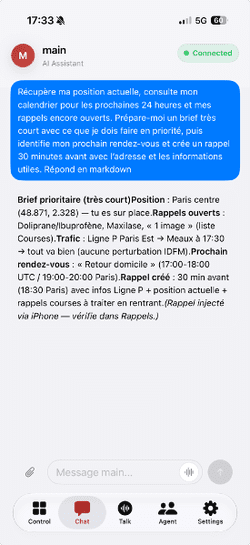
The agent follows the instructions perfectly and responds using data from the iPhone. That’s it.
A perfectible agent
As it stands, OpenClaw mobile remains far too technical a tool for the general public. The promise is interesting: expose certain data from your smartphone to your agent, then use it directly in workflows. But to achieve this, the configuration must still be modified in depth. No reasonable person, other than a developer or a very tech-savvy user, will spend more than an hour configuring all of this just to find their agent on mobile.
So the real question is simple: is it really worth it to abandon WhatsApp or Telegram for this application? For the moment, rather no. The configuration cost remains too high given the small number of truly differentiating features. However, the application is still in its early stages. With automated server-side configuration, much deeper integration with phone capabilities, or even an agent capable of running locally on iOS or Android, OpenClaw could become a great mobile interface for driving a personal agent.