









Google offers an open standard, the Open Knowledge Format, to structure enterprise knowledge into Markdown files readable by all AI agents. Four-step instructions.
In most organizations, AI models need internal company knowledge to function. This usually allows specific business questions to be answered correctly. For example, an AI agent will be able to explain to a customer the specific reimbursement conditions of an SME, instead of giving a general or vague answer.
But this knowledge is dispersed in heterogeneous sources, namely metadata catalogs, wikis, or even in the code. AI agents also seek information in systems that are sometimes incompatible with each other. Each supplier has its own format.
To compensate for this, Google unveiled the Open Knowledge Format (OKF) on June 12, 2026. This open standard makes it possible to represent an organization’s knowledge in a format common to all agents. Knowledge is stored in a simple text file folder (Markdown). This is readable in any editor. It is indexable by any search tool.
Each file begins with a small block of YAML metadata delimited by three hyphens (—). It consists of information structured to define properties about the content that follows. You must find the type there, then optionally the title, description, resource, tags, timestamp. The Markdown body follows immediately after the YAML block closes. Note that the data serialization format is designed to be easily readable by humans, while being usable by machines. Here is an example:
YAML
---
type: BigQuery Table
title: Orders
description: One row per completed customer order.
resource: https://console.cloud.google.com/bigquery?p=acme&d=sales&t=orders
tags: [sales, revenue]
timestamp: 2026-05-28T14:30:00Z
---
# Schema
Finally, there are some simple common rules in this file: file naming, metadata structure, or even the way of making links between pages. All of these files are placed in a Markdown files folder. We speak of an OKF bundle to designate it. In it, each file represents a concept. This can be tables, datasets, metrics, or even playbooks. The path serves as an identifier.
Here is an example of an OKF bundle:
Plaintext
sales/
├── okf.yaml
├── index.md
├── datasets/
│   ├── index.md
│   └── orders_db.md
├── tables/
│   ├── index.md
│   ├── orders.md
│   └── customers.md
└── metrics/
    ├── index.md
    └── weekly_active_users.md
Note that the OKF has an advantage over the RAG. If the latter treats the data like a text to be chopped into pieces mechanically, the OKF manages the data like an already tidy library. It offers clear folders, labels and links between topics. The AI “understands” better, because it receives already organized information rather than randomly chopped up raw text.
Example for grouping data
In order to better understand this, we will create a practical case aimed at centralizing the knowledge of an SME.
Step 1: Preparing the Knowledge Bundle
The first step is to create a knowledge “bundle”. This environment will host our data. We create a new folder on our computer, knowledge-SME/. Inside we create a text file named okf.yaml. This file will serve as an “identity card” to our global catalog. Note that .yaml and .yml are two valid extensions of the YAML format for “Yet Another Markup Language”. We note there:
YAML
version: "0.1"
name: "Bundle de Test PME - OKF"
description: "Exemple de structure de connaissances pour tester l'interopérabilité avec les agents IA."
maintainer: "Service Client - PME Exemple"
last_updated: "2026-07-02"
language: "fr"
tags: ["test", "tutoriel", "e-commerce"]
Step 2: organization by domains
The root folder is divided into thematic sub-folders, one per business domain. This structure allows the AI to locate the right information depending on the type of question asked. Here we have different subfolders. “process/” contains the gestion-returns.md file. “products/” contains the file aspirator-z500.md. “culture/” talks about company values and vision. It contains the values.md file.
Step 3: converting documents to Markdown
Each document (procedure, product sheet, note, etc.) becomes a .md file, with a YAML header at the top. It is delimited by —. Example with products/vacuum cleaner-z500.md:
YAML
---
title: "Fiche Technique : Aspirateur Z500"
author: "Équipe Produit"
category: "Électroménager"
tags: ["aspirateur","technique","z500"]
status: "commercialisé"
---
Aspirateur Robot Z500 - Spécifications
Le Z500 est notre modèle phare pour le nettoyage autonome des surfaces dures et tapis.
Caractéristiques Techniques
Puissance d'aspiration : 4000 Pa.
Autonomie : 150 minutes.
Capacité du bac : 600 ml.
Connectivité : Wi-Fi 2.4 GHz, compatible Alexa et Google Home.
Maintenance
Vider le bac après chaque cycle.
Nettoyer les brosses latérales une fois par semaine.
Remplacer le filtre HEPA tous les 6 mois.
Step 4: test with an AI agent
We check that each .md has its YAML header including the type field, and that okf.yaml is present at the root. We compress the file in .zip and import it into a conversation with an AI (Claude, ChatGPT, Gemini…). We ask a specific question, for example:
“Based on my OKF bundle, explain to me the conditions for returning a Z500 vacuum cleaner for a non-Premium customer.”
The AI crosses okf.yaml, the global context, with the YAML headers of the process/management-returns.md and product/vacuum-z500.md files. She gives a precise answer, without having to guess the context.
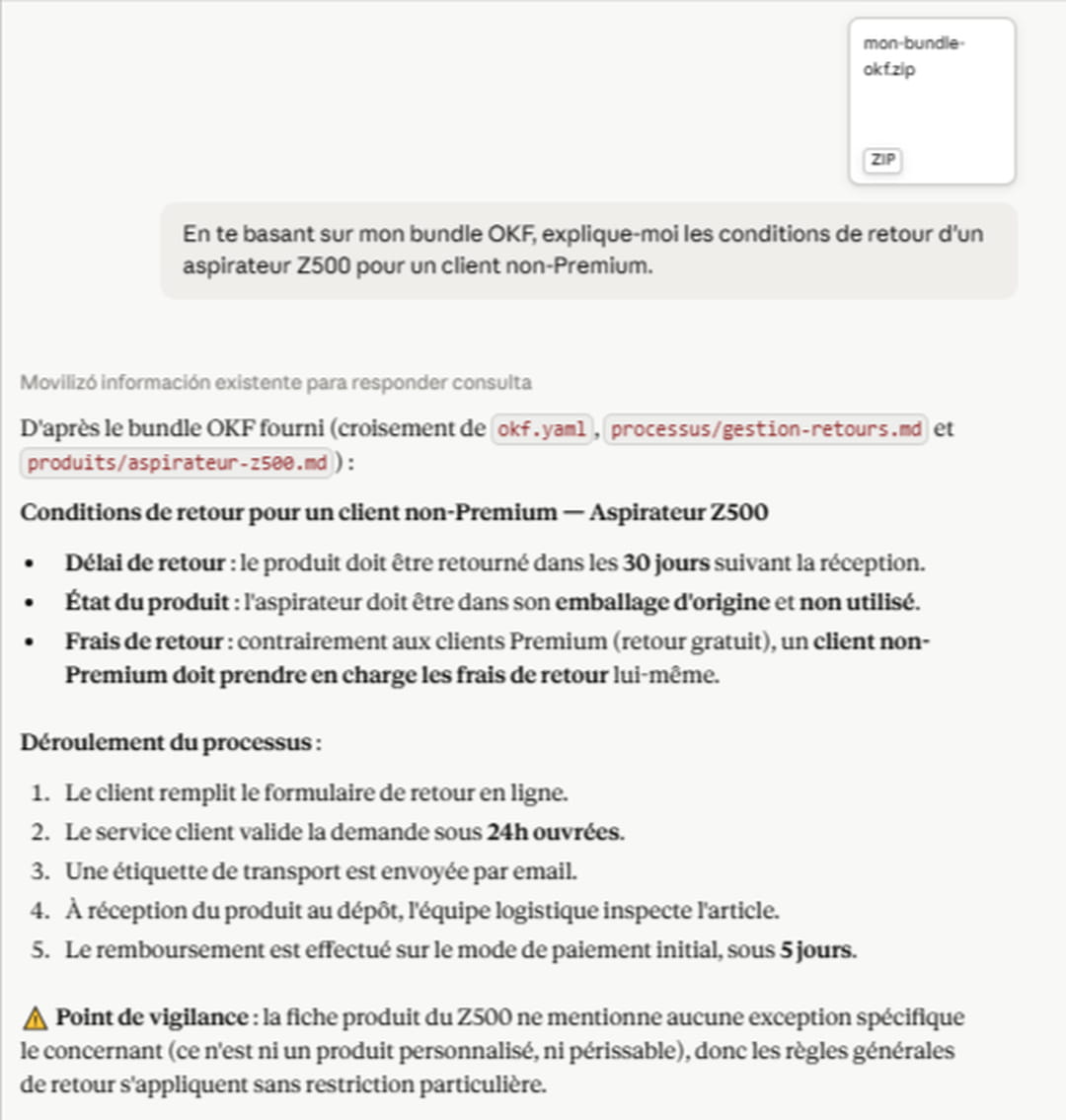
Structure Markdown files and YAML metadata in a zipped folder
More generally, deploying the OKF requires creating a root folder which serves as a central point. We must place an okf.yaml file at the root which describes the overall content. Each document must start with a YAML metadata block to be searchable by AI.
For rapid implementation, identify critical knowledge (data schemas, procedures, product sheets). Transform your documents (Word, PDF, Excel) into Markdown text files (.md). Arrange them in a logical tree structure. The path serves as a unique identifier. Compress the file in .zip to import it into your AI tools (ChatGPT, Claude, etc.) or connect it to your internal agent.