








More ambitious than OpenClaw, more open than its proprietary competitors, Hermes Agent promises an AI agent that learns from each task and develops its own tools.
After OpenClawit is the new productivity agent of the moment. Launched by the American laboratory Nous Research in February, Hermes Agent promises time savings and truly intelligent assistance on a daily basis. The tool pushes the concept of a personal agent to its climax by offering an AI that is not only autonomous and equipped with a memory, but also self-learning. Throughout the discussions, Hermes Agent promises to improve itself by creating skills and other tools to serve you ever more precisely and quickly.
The principle of Hermes Agent
Hermes Agent stands out primarily through its design philosophy, anchored around continuous improvement. Very concretely, when the agent completes a task that required 5 tool calls or more, it will automatically create a skill to remember it for the next request. This skill contains the name of the task, the steps that worked, the errors encountered and the corrections applied. Then, during a next task, if a similar situation occurs again, the agent loads this file in context. If the result differs or needs to be adapted, it will then update the skill on its own. Finally, in parallel, every 7 days, a background process runs to archive and delete skills that have not been used. If certain skills are too close, he can also merge them.
On the model side, the project assumes a much wider opening than OpenClaw with: Anthropic, OpenAI, Gemini, but also Nous Portal, Featherless, without forgetting AWS Bedrock, Groq, NVIDIA, Qwen or Ollama. Hermes Agent is also aimed more at developers with native integration into VS Code, Zed and JetBrains, as well as native support for the MCP protocol.
How to install Hermes Agent?
Hermes Agent was designed for optimal operation in a Unix environment. It is available on Mac and Linux, and has just been adapted for Windows (still in beta). As with OpenClaw, it is possible to install the Hermes Agent instance on a VPS or directly on your machine. Everything will depend on your use.
To install the command, simply run the command (Mac or Linux):

On Windows, in PowerShell mode:

25 MB later, Hermes Agent is installed. Now you need to configure it. The agent offers a complete or quick setup. We opt for speed. The first step is to choose your model provider. For this installation, we are using OpenRouter with MiniMax M2.5. The advantage, at the time of writing these lines, is that the model is completely free (yes, yes).
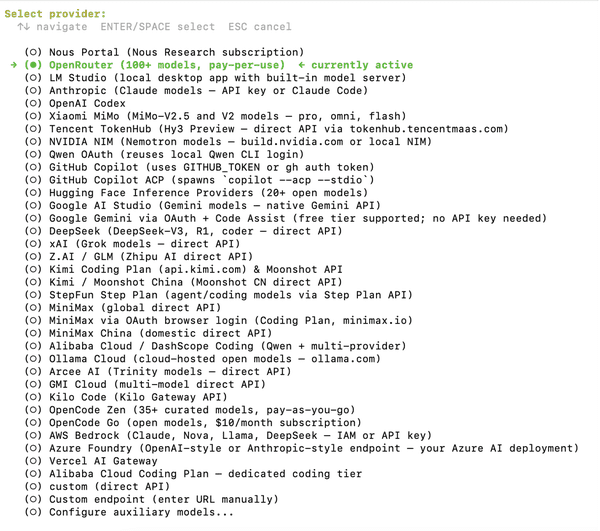
Once the provider and the engine model have been selected, it is time to choose the instance type:
- Local, for local execution
- Docker for execution in containerized mode (more secure)
- Modal for execution in a sandbox hosted at Modal
- SSH for execution from a remote server (VPS or dedicated server for example)
- Daytona for an execution from a Daytona sandbox
- Vercel for running in sandbox mode from Vercel
Here we retain execution in local mode, the simplest and most native (in particular to use local MCP connectors).
Hermes Agent then asks for the number of tool calls per conversation. The higher the number, the more tokens you will consume. A complex task requires many tool calls. The recommended minimum is 90. We advise you to adjust the figure according to your future use cases. In our case, we set the limit at 150 calls.
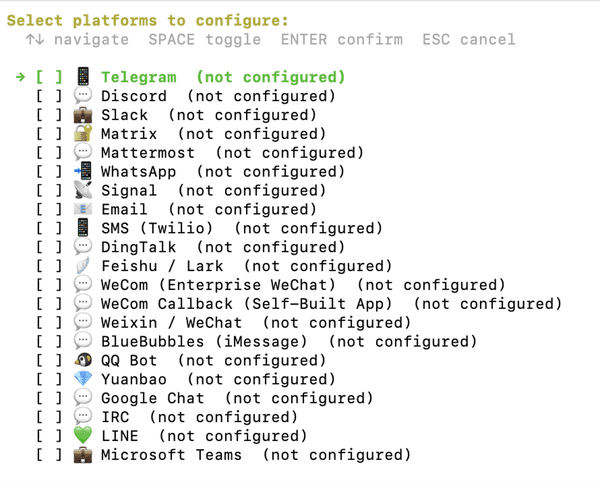
Hermes Agent then allows you to configure a third-party messaging platform to run remotely. We recommend using Telegram (setup is easy). However, it is possible to do without a third-party service for purely local use, only on your machine. This is the configuration that we retain.
Finally, Hermes Agent asks you to configure the tools made available to the agent (web search, skills, memory, etc.). We advise you to activate all the tools here.
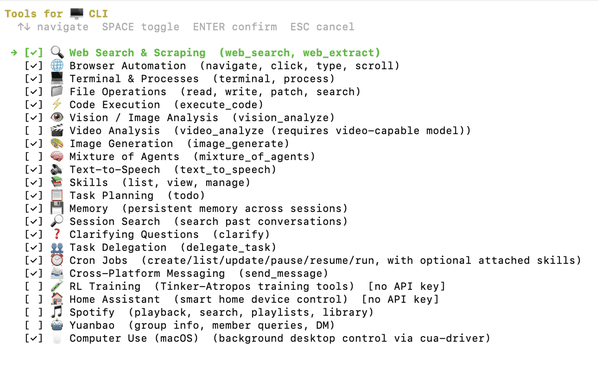
Once this step is finalized, you can use Hermes Agent. To launch the agent on your computer, enter the command: Hermes
Various use cases
The most immediately telling use case is that of the personal assistant who never starts from scratch. Hermes Agent remembers your habits, your current projects, your format and tone preferences. A freelancer can ask him to write a commercial proposal for a new client: the agent will find the previous quotes in his memory, apply the usual formatting, fetch the updated daily rates on the web and produce a directly usable document. A student can entrust him with the bibliographic monitoring of a thesis subject: Hermes collects, synthesizes, and the following week, when the subject comes back, he already knows what has been covered and starts from where he left off. It’s less a tool than a collaborator who improves over time.
On the pure productivity side, Hermes Agent also has real added value. Rather than experiencing the continuous flow of notifications, emails and messages, you can delegate monitoring and sorting to it: every morning, a consolidated brief on Telegram or Slack summarizes important emails, news from your sector and pending tasks, all formatted according to your preferences learned over the sessions. During the day, it can manage the taking of meeting notes at the same time (with automatic sending of the minutes to the participants). The difference with a classic assistant lies precisely in the skill: the first time you ask it to format a report according to your internal template, it creates a skill. The second time he executes it in seconds without a single question. In short, a real time saver.
On the developer side, it is possible to entrust it with a code review workflow, you can also leave it running on a VPS to monitor a repository and receive a Telegram alert in the event of a problem. A developer can also delegate the sorting of tickets to him in a project management tool: the agent collects incoming tickets, assigns them, starts processing them and documents them directly in the file. Even more interesting, it is possible to use it as a conductor of other agents specialized in code. Example ? By having it control Claude Code or Codex remotely, Hermes writing the prompts and rereading the product code.