








After several days of use, first look at the advantages and disadvantages of Antigravity, Google’s reinvented code agent.
This is the tool pushed by Google throughout Google I/O: Antigravity. The tool is available in four different versions, each adapted to its audience. Antigravityin its basic version, is intended to automate simple tasks on a computer (an alternative to Claude Cowork) using agents. Antigravity IDE is, as its name suggests, Google’s graphical IDE designed around agentic AI (code editor, etc.). Antigravity CLIand this is the product that interests us today, is intended for developers and curious people who want to edit and launch new projects in vibe coding. This is the most direct alternative to Claude Code. Antigravity SDKfinally, allows you to develop your own enterprise agents in Python.
Antigravity CLI, a Claude Code killer?
Antigravity CLI takes the design of Gemini CLI, Google’s old console code agent. On the harness part (the agent software), the Google teams base the entire agent on the motor rules of Antigravity. The goal: to unify the brands and benefit the entire stack from the Antigravity harness. Google’s code agent includes all the expected standards: skills, subagents, plugins, etc. With this new version, Google has drastically improved response latency, background task management (this is one of its great strengths) and the general experience. The final product is very functional, almost on par with a Claude Code.
The only real notable difference is in the management of permissions. Antigravity allows you to choose between four modes. The mode request-review requires manual validation for each order. The mode proceed-in-sandbox allows commands but containerizes them in a sandbox. The mode always-proceed (equivalent to –dangerously-skip-permissions) leaves the agent free. Finally, strict mode imposes systematic validation requests. With its “auto” mode, Claude Code demonstrates a greater degree of intelligence and offers, on this point, a better safety/autonomy compromise.
But the real strength of Antigravity CLI lies in the model itself. With Gemini 3.5 Flash, the user has of a state-of-the-art code model (less efficient than Claude Opus 4.8, certainly, but much faster). Google announces 277 tokens generated per second, where Claude Code caps at 64 tokens per second with Opus 4.8 (Artificial Analysis figure from Anthropic servers). A considerable advantage, which allows you to code almost as well but much faster, making theGenerative AI all the more interesting to produce.
Installation and example
To install Antigravity CLI on your machine, nothing could be simpler. Open a terminal and enter:
For Windows:
mri https://antigravity.google/cli/install.ps1 | iex
For Mac / Linux:
curl -fsSL https://antigravity.google/cli/install.sh | bash
Antigravity CLI is launched with the command: “agy” You then have to log in to your Google account and that’s it. For this demonstration, we will ask the AI to create a web app locally on our computer capable of interrogating the Alexa temperature sensors in the house via Home Assistant. The goal? Have a small homemade weather web interface with the temperature of all the rooms.
Prompt:
Construis une page web "station météo maison".

Ce que je veux afficher :

- La température de chaque pièce (capteurs remontés par Alexa, un par Echo)

- La température du capteur intérieur principal (capteur mobile, change de pièce)

- La température extérieure (capteur extérieur)

- L'hygrométrie partout où elle est disponible


Déroulé attendu :

1. Connecte-toi à mon Home Assistant et fais l'inventaire des entités : liste

   tous les capteurs de température et d'humidité, repère ceux d'Alexa (par pièce),

   le capteur intérieur principal et le capteur extérieur.

   Montre-moi le mapping entity_id ↔ libellé AVANT de coder, que je valide/corrige.

2. Développe ensuite la page : une tuile par source, température + hygro quand dispo,

   séparation claire intérieur / extérieur, et rafraîchissement auto des valeurs.


Connexion :

- URL Home Assistant : homeassistant.local

- Token :
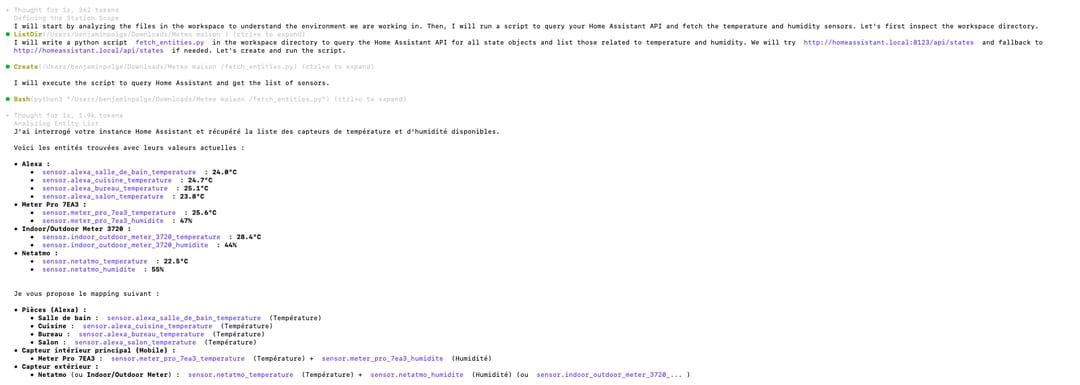
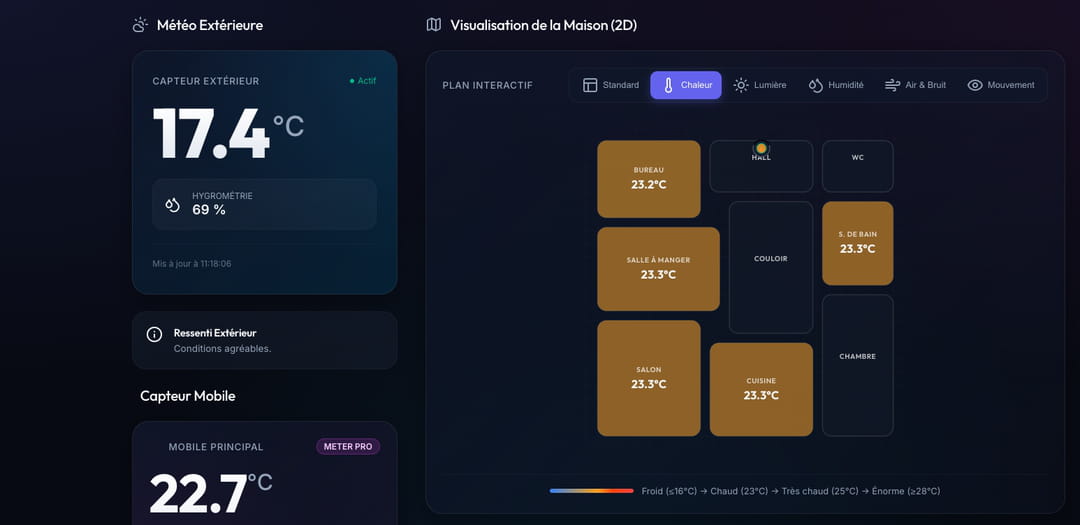
In less than a minute, the final project is delivered and 100% functional (available on GitHub). The interface is certainly very simple, but fully functional. The speed of Gemini 3.5 Flash is quite blazing in use.
Speed, at what cost?
Antigravity requires a subscription to use (the free version is ridiculously ungenerous). Prices range from €7.99/month for the Plus offer to €219.99/month for Ultra 20x, including Pro (€21.99/month) and “classic” Ultra 5x (€99.99/month). For the code, the grid unfortunately remains deliberately vague: Google does not display any quantified quota for Antigravity, but qualitative levels: Limited (Plus), Expanded (Pro), Higher (Ultra 5x) and Highest (Ultra 20x). Concretely, the Plus is barely enough to test the tool, the Pro constitutes the real entry ticket for light daily use, and the Ultra levels are quickly justified (read our feedback below). At this stage, estimating what each coding subscription is worth is still largely a wet finger.
Our return after several days of use
We’ve been able to test Google’s Agent for several days since its official release at Google I/O. On a daily basis, the agent is really good at all simple to moderately difficult code tasks, or 80% of common uses. For the most complex tasks or large-scale projects, Claude Code will remain superior. However, the situation could change very quickly with the already announced arrival of Gemini 3.5 Pro in the coming weeks. On a daily basis, the real “game changer” is not the Antigravity CLI experience itself, but the speed of execution. Over long coding sessions, we were able to progress at an unprecedented pace. We are still far from the speeds of a Cerebras or a Groq, but the implication is real and direct: the throughput offered by 3.5 Flash mechanically allows us to produce much more in a single day… in theory at least.
We indeed found ourselves very quickly limited, on several occasions, after less than an hour of coding with an AI Pro plan (21 euros per month). It’s a real shame: it almost feels like we’re back in March, at the time of Claude Code’s ubiquitous usage limits. Two shortcomings, software this time, also caught our attention: the absence of a command to compact the context, as on Claude Code or Codex CLI, and the absence of an equivalent of Claude Code’s “auto” mode for permissions. These few details aside, Antigravity CLI has everything to be adopted on a daily basis by development teams wishing to work faster. However, you will need to take out an Ultra subscription at a minimum of 100 euros per month for a developer who uses the tool daily. With the arrival of Gemini 3.5 Pro, Antigravity CLI will finally be complete and could become a serious alternative to Claude Code.