









Hermes Agent offers several new features, including autonomous code correction and advanced test automation, to increase the efficiency of technical teams.
Compared to traditional AI chatbots, a AI agent can open files, run code, browse the web or send emails. For its part, Hermes Agent itself differentiates itself from traditional agents on various points.
Launched last February by the American laboratory Nous Research, it promises intelligent daily assistance and major time savings. For this, beyond its autonomy and its memory, it has a self-learning capacity. While a typical agent completes a request and forgets, Hermes identifies reusable patterns. After each task, it logs them in a standalone SKILL.md file. This is then recharged to optimize the execution of future similar tasks.
Second, while traditional agents inject all past exchanges in context, Hermes uses a staged memory architecture. Compared to usual agents, Hermes also connects to more models. It integrates directly into the code editor.
In order to test its capabilities, we gave it five use cases. Objective: maximize code production.
In terms of agent installation, after installing Python, the recommended method on Linux, macOS or WSL2 is to use the official installation script in the terminal:
Bash
curl -fsSL https://hermes-agent.nousresearch.com/install.sh | bash
On native Windows, installation is done via PowerShell:
Plain Text
iex (irm https://hermes-agent.nousresearch.com/install.ps1 )
And we launch Hermes:
Bash
Hermes
We then go through the platform “Us Portal” and take a credit of 10 euros. This in order to choose as a model deepseek-v4-flash. This one has perhaps the best value for money. It costs around 10 cents per million tokens to enter and around 20 cents per million tokens to exit. Note that this open source language model offers a context window of 1000K tokens. It is particularly suitable for code generation, advanced search, RAG and mass inference. After activating the different options and keeping the execution local, we launch Hermes, by simply typing “Hermes” in PowerShell.
Let us indicate that it is possible to delegate Hermes’ tasks to Claude Code. To do this, it is recommended to use one-off delegation with the -p flag, that is to say the option that is added to a command to modify its behavior. For example :
Bash
claude -p "Ajoute la gestion d'erreurs sur tous les appels API dans src/"
 --allowedTools "Read,Edit" --max-turns 10
In this case, Hermes launches the command from its terminal, retrieves the result and continues its workflow.
Use case 1: automated code review
Checking your work before saving it to the project history can be time-consuming. A classic agent would wait for an instruction each time. Hermes must be able to independently read each file, analyze it, summarize it and write a report.
To test it, we type in PowerShell:
PowerShell
hermes -p "Analyse tous les fichiers dans C:chatbot-rag-local et génère un rapport de revue de code dans un fichier review.md" --yes
To decipher this prompt, let’s indicate that “hermes” accompanied by the flag “p”, allows you to ask the agent to launch a direct prompt. It does not open interactive mode. At the end of the prompt, the “yes” flag allows Hermes to execute all actions, without asking for confirmation at each step.
After about twenty minutes, Hermes read the files. He returned a detailed report with the points to be corrected, classified by priority. The review.md file was also created successfully.
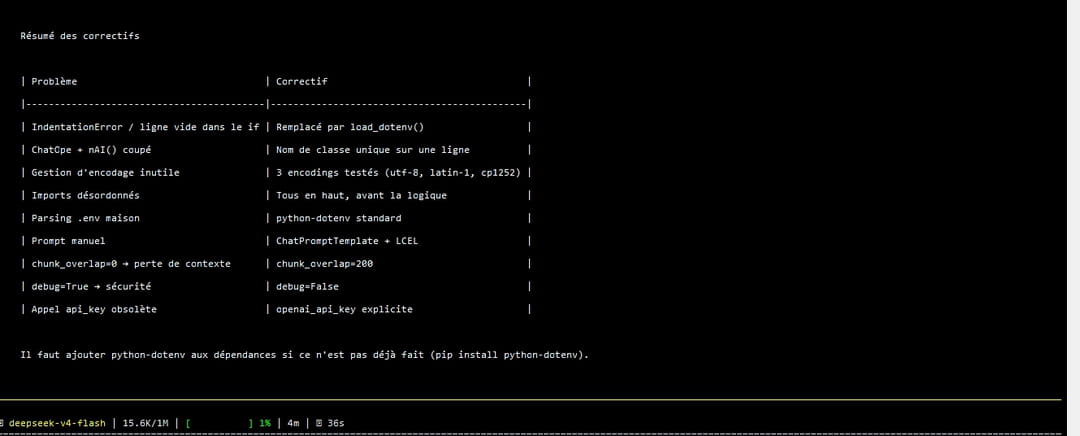
Here we see a summary of the problems and the associated fixes for the different files. For example, the report talks about a formatting error that crashes Python and suggests a solution.
Use case 2: error correction with persistent memory
During development, it sometimes happens that you come across a recurring error. A traditional agent may solve the problem but forget the solution in the next session. Hermes can write the resolution of the problem into his persistent memory. In our case, this is the MEMORY.md file managed by the agent. Thanks to this, when restarting, Hermes rereads this file at the start of its session and knows how to react to problems.
To test it, we write:
J'ai cette erreur dans mon projet Onboarding. Quand je tape ce message dans PowerShell :
PowerShell
cd C:Usersadmin>python verif_onboarding.py
Je reçois :
Plaintext
C:UsersadminAppDataLocalProgramsPythonPython311python.exe: can't open file 'C:\Users\admin\verif_onboarding.py': [Errno 2] No such file or directory.
Diagnostique et explique-moi comment corriger. Mémorise la solution pour les prochaines fois.

Hermes recognizes Errno 2 as a Python standard error meaning “file not found”. It analyzes the path C:Usersadminverif_onboarding.py. Hermes then uses its internal memory tool (with the add action) to write the solution to its global memory file (MEMORY.md). This contains the solution: navigate to the correct folder before executing. If a similar error occurs, Hermes will automatically have this information in context when starting the next session.
Use case 3: automatic documentation generation
Maintaining up-to-date documentation can be tedious. Functions evolve, comments do not follow, and the project can become more cumbersome to manage. Whereas with a traditional assistant, the process is partly manual and fragmented, with Hermes, it is the autonomy of the agent that takes precedence.
To experiment with this, we write in Hermes:
Lis le fichier C:UsersadminMonProjetRHverif_onboarding.py. Génère des docstrings Google Style pour toutes les fonctions et classes qui n'en ont pas encore. Pour chaque fonction, documente : ce qu'elle fait, les paramètres (Args:) avec leur type, et la valeur retournée (Returns:). Montre-moi le fichier complet avec les docstrings ajoutées.
In this case, Hermes opens the file. It analyzes the code and generates the docstrings. He rewrites the document. It can then repeat this cycle on other files, without further intervention.
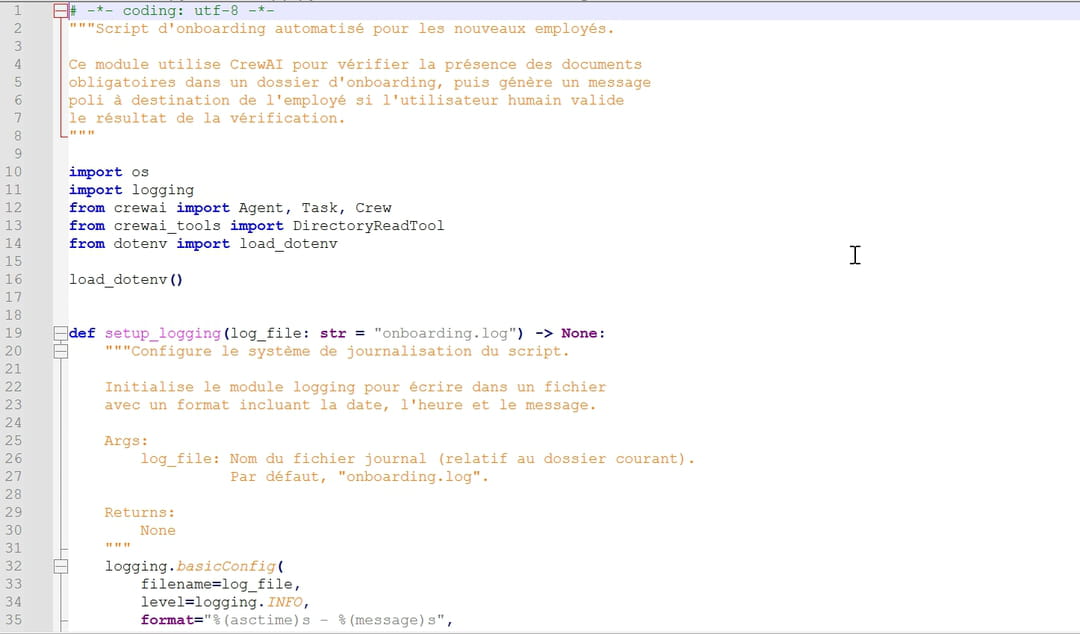
We see here that the verif_onboarding.py file has been automatically updated with the requested elements. Comments are noted in orange. Hermes respects the requested Google Style format.
Use case 4: secure refactoring with validation
Code refactoring involves restructuring the interior of software. Its goal is to have better readability and maintainability of the code, thanks to minor modifications. While with a traditional wizard, this process involves the user, Hermes allows, for example, validation tests to be executed.
To work this out, we write:
Je travaille sur le projet situé dans C:chatbot-rag-local. C'est un chatbot RAG en Python. Je veux remplacer toutes les utilisations de l'ancienne fonction fetchData() par la nouvelle librairie fetchClient. Parcours tous les fichiers .py du projet un par un. Pour chaque fichier concerné, applique la modification. Puis lance pytest pour vérifier que rien n'est cassé. Si les tests passent, continue au fichier suivant. Si un test échoue, annule la modification de ce fichier, note le nom du fichier et le message d'erreur dans un fichier refacto-log.md à la racine du projet, et passe au suivant. A la fin, donne-moi un résumé de ce qui a été modifié et de ce qui a échoué.
We see that Hermes runs the tests and reads the result. If the test is successful, the agent designed by Nous Research starts the procedure again with the next .py file in the list. If it fails, it rolls back the change.
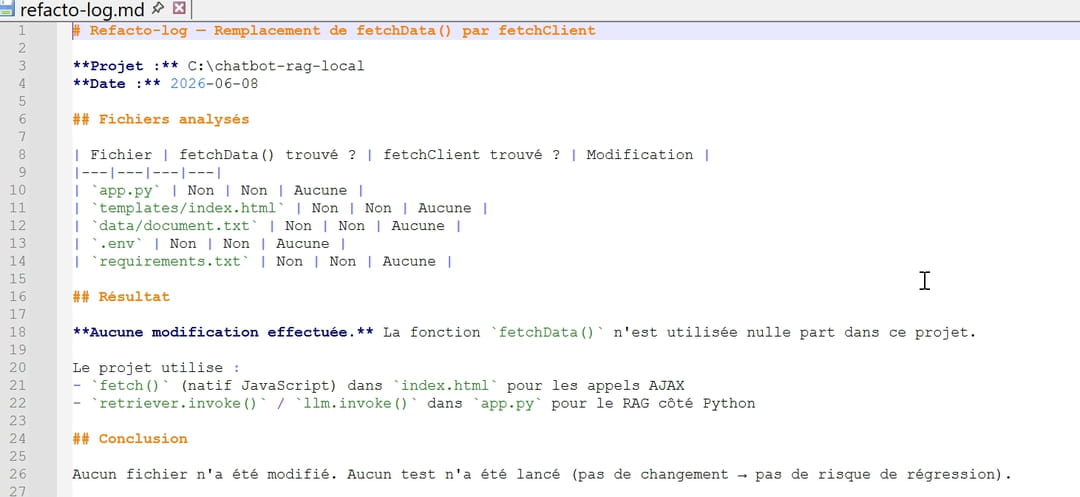
Here, Hermes has produced a structured report in refacto-log.md. He didn’t change the code unnecessarily.
Use case 5: notification in Slack
A notification on Slack, for example, lets you know that Hermes has completed a task. Note that Hermes Agent natively integrates a cross-platform gateway functionality, or Gateway, allowing it to be connected directly to Slack, Discord or Telegram. However, you can also create a custom script.
To set this up, you can create a #hermes-notifications channel in Slack. For this, on api.slack.com/apps, we create a new App. We go to Incoming Webhooks and activate Add New Webhook. We then copy the URL. The new App, called “Hermes”, is created “from scratch”, in a local file, here C:Usersadmin.
We then create the notif.py file there by typing:
Python
import requests, sys
WEBHOOK = "VOTRE_URL"
message = sys.argv[1] if len(sys.argv) > 1 else "Hermes a terminé une tâche."
requests.post(WEBHOOK, json={"text": message})
To find out if it works, write in PowerShell:
PowerShell
cd C:Usersadmin
python notif.py "Test Hermes✅"
The message “Test Hermes ✅” went well in the Slack channel.
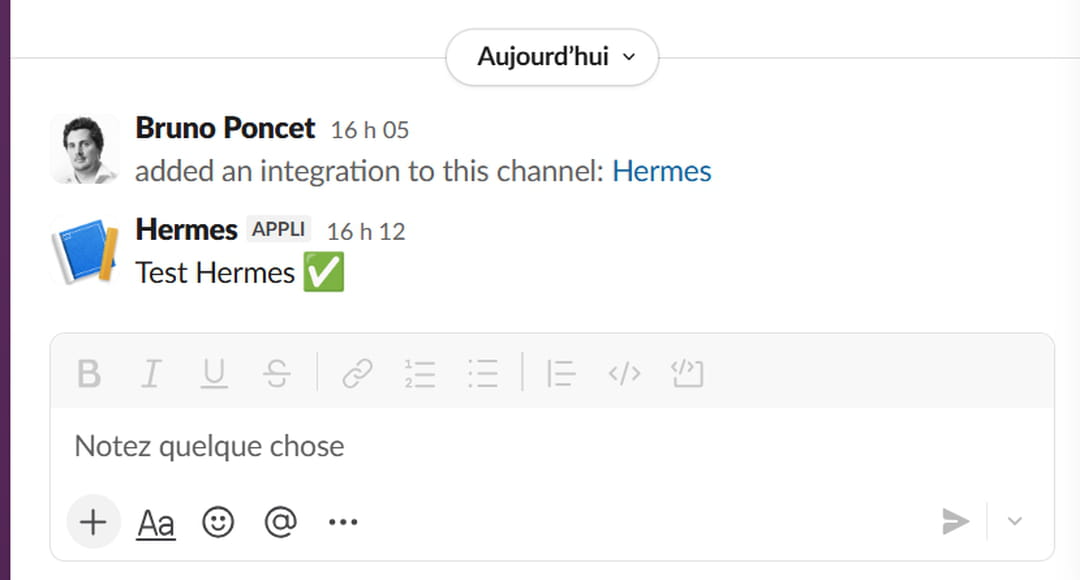
We then mention this in Hermes:
Génère une fonction Python qui calcule le nombre de jours travaillés entre deux dates en excluant les week-ends. Sauvegarde-la dans C:Usersadminjours_travailles.py puis exécute : python C:Usersadminnotif.py "✅ jours_travailles.py généré"
After several tens of minutes, Hermes created the file and sent the notification to Slack.