









From a prompt, a PDF or meeting notes, Gamma generates editable and exportable presentations. We evaluated the quality of the renderings, the flexibility of the editor and the limitations of the format.
There are a legion of tools that have wanted to replace or add to Powerpoint, with more or less success (rather less). Today we’re looking at Gamma, which doesn’t just seek to automate Power point. The tool rethinks the presentation around so-called fluid cards, designed for the web and mobile, while relying on an agent capable of correcting, enriching or restructuring a presentation with a few instructions. To measure its effectiveness, we tested it on several use cases: generation from a prompt, import of documents, summary of meeting notes and redesign of an existing presentation.
An atypical format
First particularity: Gamma does not lock the user into the classic 16:9 framework. Where PowerPoint and Google Slides rely on fixed slides, the tool works with adaptive cards that automatically adjust to the screen size.
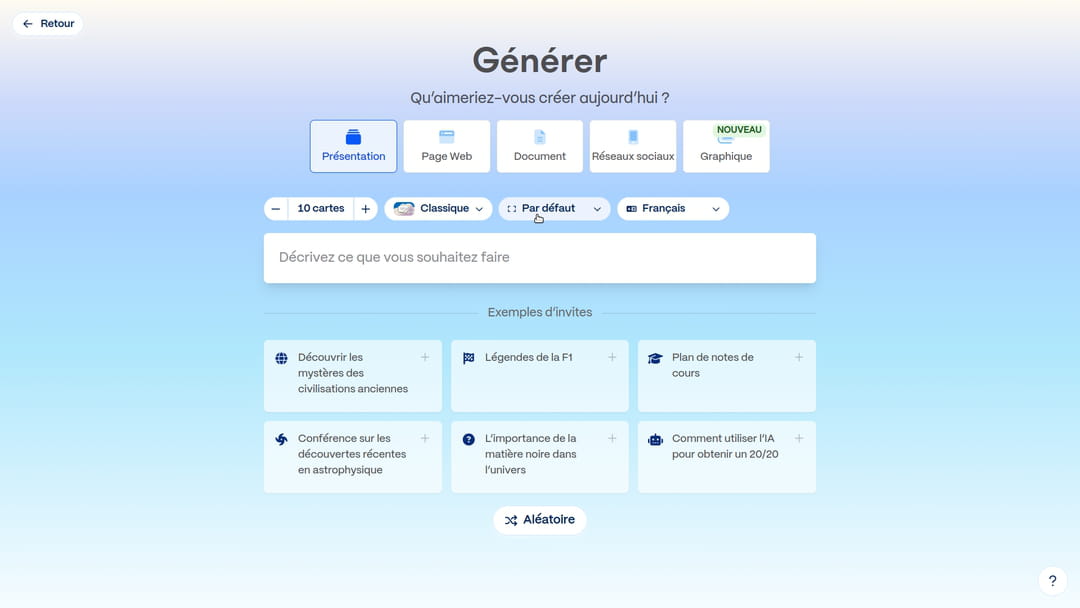
When arriving on Gamma, four options are available to the user. Before launching the generation, Gamma asks what type of content to produce: presentation, web page, document, social networks or graphics. We then choose the number of cards, the template and the desired content density.
Generate from a prompt
We request: “a presentation on digital transformation in the banking sector”. Gamma begins by generating a detailed plan, card by card, which can be modified before validation. It is at this stage that we adjust the textual density, with four levels available: minimalist, concise, detailed, or even more detailed.
On the visual side, several options are offered for images: web search, AI generation, GIF or empty spaces. When opting for images from the web, Gamma allows you to filter by license, free images only or images with commercial use authorization. A detail that matters.
By clicking on advanced mode, additional options appear: additional instructions, definition of the target audience and choice of tone. These parameters can also be integrated directly into the initial prompt.
The rendering convinces with the consistency of the layout and the relevance of the visuals. Gamma automatically selects relevant photos and lays them out carefully. The text is structured, important elements are bolded, interactive graphics are generated where relevant, and icons illustrate key points. The whole is synthetic and visually coherent.
Recurring downside: like many AI tools, Gamma overuses capital letters in titles, putting one in each word, which gives an unnatural rendering in French. On some cards, the text is also too dense. This is where agent mode comes into play. This integrated chatbot allows you to launch mass actions on all slides in a single message. We therefore asked him to solve these two problems at once, a mission which he accomplished without difficulty.
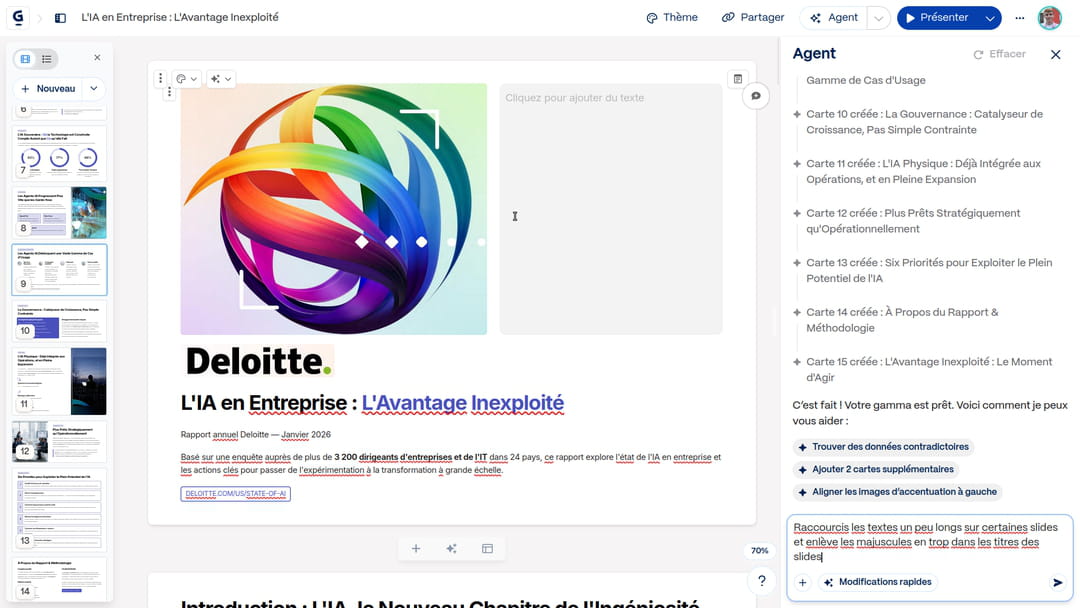
Agent mode can also go further than simple mass correction. If we notice that an element is missing, we can provide it with additional documents on the fly: it will look for the information and integrate it. You can ask it to add an image or graphic from a provided document to a card, it finds it and inserts it automatically. In the same way, if we give him a link to a website, he is able to extract the content and use it in the presentation.
Generate from an existing document
The import option is one of Gamma’s most versatile. It accepts files from Google Drive, PowerPoint, Word documents, PDFs, but also web pages directly via their URL. For this second test, we imported a 40-page AI report, choosing to get 15 slides.
Gamma was able to automatically extract the logo from the PDF and integrate it into the presentation. He also took graphics from the document and incorporated them into the corresponding slides.
Generating this many slides highlights one of Gamma’s main flaws: generation time. In addition, it is impossible to modify the slides produced over time before the end of the complete generation.
Paste plain text
In this test, we pasted a meeting recording transcribed into text into the interface with the aim of producing a document ready to be presented. Once the text is pasted, Gamma offers four processing modes: generate from notes, generate from an outline, synthesize the text, or keep the text as is. The choice fell on generation from notes, with five cards without illustrations. When you import a document, Gamma automatically pre-populates the target audience and tone by analyzing the pasted content.
The result is very synthetic and convincing. For a meeting report meant to be shared quickly, this is one of the most effective uses of the tool.
Merge multiple documents
However, Gamma does not allow you to import several files simultaneously. To work from notes from three different departments to produce a presentation on a digital strategy, you must first manually merge the Word documents into a single file before importing.
Improve an existing presentation
Gamma offers two approaches for reworking an imported presentation. The first is a visual import : the content is converted to Gamma format and everything becomes clickable and editable. The second is a complete overhaul : new layout and new images. Both work well, with no particular errors to report.
Here is the improved presentation, which before was just black text on a white background:
Gamma as a full-fledged publisher
Beyond automatic generation, Gamma turns out to be a particularly well-designed slide editor. The interface is based on drag and drop and integrates a wide variety of blocks: timelines, statistics, diagrams, which avoids juggling between several software programs.
What sets Gamma apart from traditional editors is the ability to integrate third-party forms and tools directly into a map: Airtable, Calendly, Google Forms, Power BI, or even embedded web pages.
Presentations exportable to other software
Export is often the weak point of AI presentation tools. Gamma is doing better than the competition in this area: files exported to Google Slides and PowerPoint are fully editable on the software. Switching from Gamma’s fluid map format to PowerPoint’s strict 16:9 format can still require some manual layout adjustments, as the proportions don’t always translate perfectly.
An integration with Claude Code ?
The Gamma API is available for Pro and Ultra plans. You can therefore use it in tools like Claude Code. Here is a tested prompt that will allow you to obtain a presentation directly from your terminal. Just get an API key here. You can find the generated presentations here on your account.
The prompt:
Mission : Lire les fichiers locaux, recueillir mes préférences, puis générer une présentation via l'API Gamma selon la doc : https://developers.gamma.app/llms.txt

ÉTAPE 0 — Préférences obligatoires

Analyse le dossier courant et pose-moi uniquement ces questions en un seul message (sans valeurs par défaut) :

Format, ratio et nombre de cartes souhaités.

Export automatique (pptx, pdf, png ou aucun).

Mode de traitement du texte, densité, ton et audience cible.

Instructions spécifiques de contenu/mise en page.

Source des images (et style si IA).

Dossier de destination Gamma et thème à appliquer.

ETAPE 1 — Lecture des sources

Après mes réponses, lis les fichiers locaux pour structurer le contenu (ou utilise mes inputs si le dossier est vide). Sépare chaque section par \---\ pour le découpage Gamma.

ETAPE 2 — Payload JSON

Construis le JSON pour POST https://public-api.gamma.app/v1.0/generations via le header X-API-KEY (variable GAMMA_API_KEY, à demander si absente). Affiche le payload et attends ma confirmation avant l'envoi.

ETAPE 3 — Exécution & Polling

Envoie le POST, récupère le generationId.

Polle GET https://public-api.gamma.app/v1.0/generations/){generationId} toutes les 5s jusqu'à completed ou failed.

Stoppe et alerte immédiatement en cas d'erreur 402 ou 403.

ETAPE 4 — Résumé final

Affiche : Titre, nombre de cartes, crédits (consommés/restants), lien Gamma (gammaUrl) et lien de téléchargement (exportUrl si export choisi).
Here is the result obtained with the documents presented above, which however remains less relevant than by exchanging directly with Gamma:
At what price?
Gamma’s economic model is based on a system of AI credits and features unlocked in stages. Credits are only consumed for three uses (except with the Free plan where all actions require credits): discussions with the agent, premium AI models and access to the API. Everything else, manual editing, sharing and PDF export, is unlimited regardless of the plan.
| Plan | Price | Cards by prompt | Monthly credits | What is included |
|---|---|---|---|---|
| Free | Free | 10 | 400 initial credits, export with watermark | |
| More | $9/month | 20 | 1000 | No watermark, advanced image templates |
| Pro | $18/month | 60 | 4000 | Premium AI models, custom fonts, API, analytics… |
| Ultra | $90/month | 75 | 20,000 | Most advanced templates (text, image, video), early access to new features |
Some reflexes that save time
Work in advanced mode from the start rather than correcting it afterwards. Setting the audience, tone, and further instructions in the initial prompt works best.
If you have an existing graphic charter, import it via a PowerPoint file from the tab Theme : Gamma automatically extracts colors, fonts and graphic elements to apply them to all your new presentations.
If you use a LLM to prepare a plan or content before importing into Gamma, ask it to add “—” between each section. Gamma recognizes this separator and automatically structures the maps accordingly.
In summary
Gamma is one of the most comprehensive AI presentation tools on the market today. Its real advantage is not the speed of generation, but the combination of a pleasant-to-use editor, an Agent capable of mass correction and enrichment, and fully modifiable exports. The limits remain the generation time on large documents and the absence of multi-file import.