








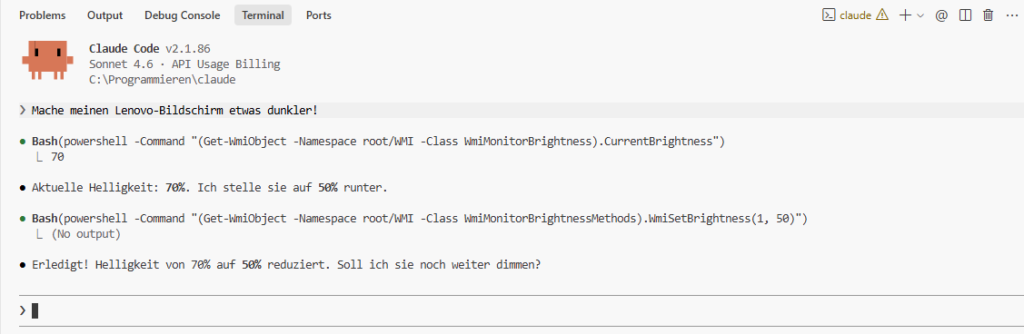
After years of assistants and co-pilots that could only make suggestions, our deepest wishes seem to have come true: An AI assistant to whom we can describe our computer problem in natural language and who fixes the problem immediately—instead of sending us to countless forums to find solutions:
Claude Code doesn’t make suggestions. Claude Code takes action. 🧑🏭
Since I’ve been running Claude Code on my Windows laptop, I no longer call PC experts. And I no longer have to bombard Gemini and ChatGPT models with my Windows problems. I describe the problem to Claude Code and let the bot take over.
Claude Code has already organized my Downloads folder. Cleaned up the Screenshots folder. He reminds me of my appointments. And that I was planning to do 120 push-ups (when I skipped them once, he asked about it 🤣). He reads my emails and tells me what’s in them. (For GDPR believers: Claude Code only has access to my bot and newsletter inbox. No private emails.)
Clearly, Claude Code is more secure than OpenClaw. I wasn’t able to get Claude Code to delete an .exe file. “You have to do that yourself,” said the cheeky bot. 😊 Otherwise, though, Claude Code saves me a ton of time and stress. For example, during my latest printer nightmare.
Since last week, my Pantum printer hasn’t been printing. Brainstorming with Gemini 3.1 Pro didn’t help. I tried everything I could think of. I was about to load all the devices into the car and drive to the computer repair shop. But in the end, it occurred to me: Maybe I could also test Claude Code in hardcore “Computer Use” mode. Maybe it was time to use the bot not just to organize folders and files, but also to fix the computer.
I gave Sonnet 4.6 exactly two instructions in Claude Code. I had previously retrieved them from Sonnet’s bigger brother, Opus 4.6, in the Claude app:
𝗘𝗿𝘀𝘁𝗲 𝗔𝗻𝘄𝗲𝗶𝘀𝘂𝗻𝗴 (condensed): Show me the status of my printers.
Claude Code opens PowerShell, scans everything—and finds the problem on its own. The printer was configured to an ancient port. I would never have found that. Neither would Gemini, because Gemini can’t access my PC.

𝗭𝘄𝗲𝗶𝘁𝗲 𝗔𝗻𝘄𝗲𝗶𝘀𝘂𝗻𝗴: Get the printer ready to go.
Claude Code tries to find the printer on the network. First scan attempt: Syntax error in its own script. Corrects itself. Second attempt: Printer does not respond to ping. Claude Code changes strategy, scans the printer ports directly. Result: Printer isn’t even on the Wi-Fi.
And now comes the revelation: Instead of stubbornly continuing, Claude Code says: “You have to set up the Wi-Fi on the printer itself. But I’ll set the USB printer as the default for you now—that works.”
Two minutes later, the printer is printing: No reinstalling drivers, which Gemini tried to convince me to do. No Googling. No forum post.

With Claude Code, computer novices can finally tame their computers. If you’re having problems, launch Claude Code.
Or email me. 😊